
An AI agent that has never seen your Bubble app guesses. Ask it where the invoice email gets sent, and it tells you how Bubble apps usually do it. Not how yours does.
Claude Code for Bubble.io has an official route now. Since 6 October 2026, Bubble ships an MCP server (in beta) that lets Claude Code and Codex create and edit pages, workflows and data types in your account. Connecting takes one command and a browser sign-in. Letting an agent loose on an app that real people use is a different question.
This guide covers the loop we run: six steps, the limits Bubble documents, and four free skills that run the loop for you.
Can Claude Code work on a Bubble app?
Yes. Bubble's official MCP server lets Claude Code or Codex create and edit pages, elements, workflows and data types in your Bubble account. It works as you: your permissions and your plan apply, and it cannot merge branches or deploy.
To connect Claude Code, run this once in your terminal:
claude mcp add --transport http --scope user bubble https://mcp.bubble.io/mcp
Then type /mcp in Claude Code, pick bubble, and sign in to Bubble in the browser window that opens. Codex takes two commands:
codex mcp add bubble --url https://mcp.bubble.io/mcp
codex mcp login bubble
What Bubble's MCP article says about the limits:
- The agent acts as your signed-in Bubble user. If your plan has no backend workflows, it cannot create them either.
- Development database: read and write. Live database: read only.
- It cannot merge branches or deploy. Changes reach your live app only when you deploy them.
- It does not use Bubble AI credits. The work counts toward your account with your AI provider.
Bubble's release post says the beta is meant for experienced builders who want to grow apps they already have. That is the right reading. It is a power tool, not a starter kit. Bubble also recommends trying its in-editor agent first. If you are new to Bubble, do that. Everything below assumes you can read the Bubble editor.
Connecting is the easy part. The real question is what the agent knows about your app when it starts.
Three ways an agent can reach your Bubble app
There are three routes, and they do different jobs.
| Route | Where you work | What it does | What it costs |
|---|---|---|---|
| Bubble's MCP server | Your own agent: Claude Code, Codex | Creates and edits your app | Your AI provider account |
| Bubble's in-editor agent (Agent 2) | Inside the Bubble editor | Edits your app from a plan you approve or cancel | Bubble AI credits |
| The app's export file | Your own agent, on your machine | Reads only: answers questions about the app's structure | Your AI provider account |
Bubble's manual describes the in-editor agent: it shows a plan before it changes anything, and an approval mode decides how often it asks. Ask confirms every change. Auto decides when to ask. It works with the permissions of whoever starts the chat.
The first two routes are Bubble's products, and the setup guides cover them. The third is how an agent learns your app before it touches it, and the guides skip it. The skills later in this guide are made by NocodePro, not by Bubble.
The first two routes change your app. The third gives the agent the real picture first.
Why an agent that has not read your app guesses
An edit is only as safe as the agent's picture of the app.
Take a sample app, orderdeck, and three questions:
- Where is the invoice email sent?
- Which workflows change an Order's status?
- Which privacy rules guard Invoice?
The first two need every workflow in the app. The third needs the data types and their privacy settings. An agent without that picture answers from habit. An agent with the app's export answers from the app. A good answer names the workflow, the step that makes the change, and the path to click in the editor, so you can check it in seconds instead of trusting it.
The export holds the app's structure: pages, reusable elements, workflows, data types, API calls. It does not hold your records. That is why reading it is a safe first step.
I wrote about what 10,000 hours in Bubble teaches you. The short version: the hard part is structuring the system, not clicking through the editor. An agent needs that structure before it edits anything.
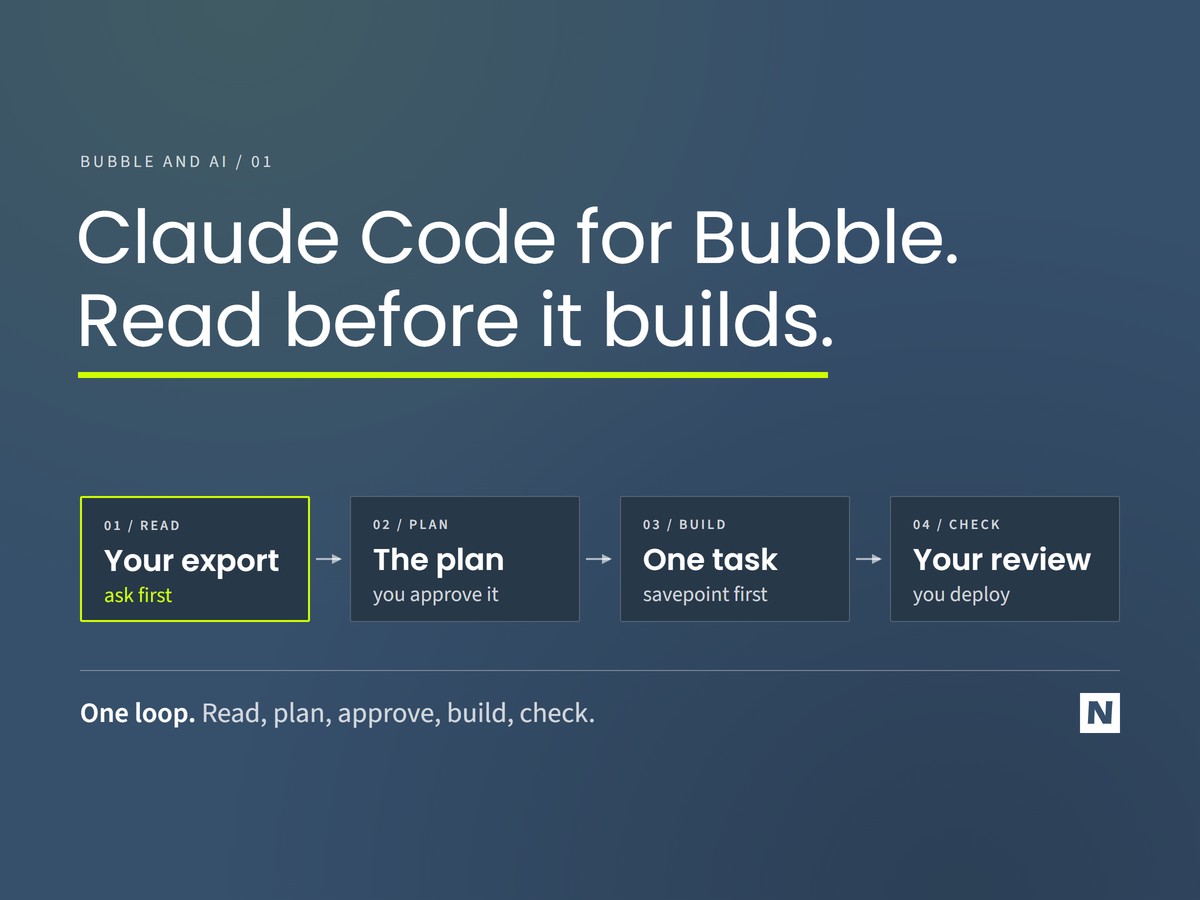
The safe loop for Claude Code on a Bubble app, in six steps
- Export a fresh copy and clean it. Export the app from the editor, then run it through a free LumiDevKit account so secrets are stripped before the agent reads it. Do this every time. An old export describes an old app.
- Ask before you change anything. Where is this field used? Which workflows write to it? Which privacy rules guard the type? Every answer should come with the path you would click in the editor.
- Turn the ticket into a plan. The plan counts every page, reusable element and workflow the change really touches. It keeps your acceptance criteria as written. It marks every task that touches data, privacy, access or live users as a stop point.
- Approve the plan. Nothing is written before this. If the plan is wrong, say so here, while fixing it costs nothing.
- Take a savepoint, then build one task at a time. Bubble's MCP can create a savepoint before a big change and restore it later. The agent builds one task, reads it back, runs Bubble's issue check, and runs a short smoke test after anything that writes data. All of it on the development version.
- Check once at the end, then take over. Run the ticket's acceptance checks against the finished build. You review, merge and deploy. The agent never merges or deploys, and the MCP cannot.
Simple as it is, the order matters. Skip step 4 and you are letting an agent improvise on your app.
What can still go wrong with an AI agent on a Bubble app
Bubble documents the limits, and they are real:
- Changes made through the MCP do not go into the editor's undo history. Pressing undo in the editor will not reverse them.
- A savepoint restore replaces every change made since, including edits you made by hand.
- Records the agent deletes cannot be restored by undo.
- The in-editor agent cannot delete data types or fields, and cannot change an existing field's type. It declines very complex workflows.
- The in-editor agent reads app data only for owners and admins.
- The MCP is a beta, and Bubble's own pages move. The release post of 6 October says the MCP cannot read logs. The support article now says it can. Check Bubble's pages before you rely on a limit.
Each limit has a step in the loop that covers it. The savepoint covers the restore. The plan, with its stop points, covers anything that touches data. The development version keeps live data out of reach. Bubble's own advice is to try the MCP on a test app first, and I would not skip that either.
Mistakes that cost the most time
- Building from a stale export. The agent answers about the app you had last week. Export again before each ticket.
- Asking for a whole feature in one go. Bubble's manual says to keep prompts short and to stick to one feature request per prompt. The loop goes one step further: one task at a time, each read back before the next starts.
- Editing by hand while the agent builds. A savepoint restore replaces every change made since, yours included. One writer at a time.
- Trusting the agent's summary. A summary says what the agent meant to do. Bubble tells you to open the preview link or the editor and check each element, workflow and data type. Take that quick look after every task, and keep the full acceptance checks for the end.
Bubble Copilot Skills: a free set that runs the loop
We packaged the loop as four skills for Claude Code and Codex, free for an email address. They are made by NocodePro, not by Bubble.
- bubble-copilot answers questions about the whole app from its export, with the editor path and a link that opens it there.
- bubble-ticket-plan turns one ticket into ordered tasks before anything changes.
- bubble-editor builds the approved plan through Bubble's MCP, one task at a time, with a savepoint, a read-back and the issue check. Where the connector cannot reach an app, it uses the browser or Bubble's in-editor agent.
- bubble-practices holds more than 100 rules on security, privacy, data, workflows, naming and testing, each with its reason.
The set is four skills, more than 100 rules and 656 tests that pass from a bare unzip, in a 695 KB download. We run this loop on real Bubble apps every day.
Here is how a small ticket goes on orderdeck: let a customer archive an Order. The plan lists the Order type, the page that shows orders, the workflow behind the button and the privacy rule on Order. It marks the privacy rule as a stop point and waits for you. You approve. The agent takes a savepoint, builds the field and the workflow, reads each change back, runs the issue check, and tells you what to look at in the editor.
The set stops for your word before anything that touches data, privacy, access or live users, builds on the development version only, and never merges or deploys.
If your problem is design rather than logic, the free Bubble Design System Skill reads a LumiDevKit export of your styling and writes a design system your agent can follow.
How to install the Bubble Copilot Skills in five steps
- Download the zip from the resource page and unzip it.
- Copy the four skill folders into your agent's skills folder:
~/.claude/skills/for Claude Code,~/.agents/skills/for Codex. - Install Node 22 or later. The copilot's command-line tool needs it.
- Add Bubble's MCP server with the command from the first section.
- Start a new session, put a sanitized export in the folder, and ask: "Which workflows change an Order's status?"
Free Agent Skills
Bubble Copilot Skills
Four free agent skills for Bubble developers: ask how anything in your app is built, plan a ticket with checks, build it through Bubble's official connector, and follow 100+ rules on privacy, data and workflows.
Frequently asked questions
Can Claude Code edit an existing Bubble app?
Yes, through Bubble's official MCP server, which is in beta. Claude Code acts as your signed-in Bubble user, so your permissions and your plan apply. It can edit pages, workflows and data types, but it cannot merge branches or deploy.
Does it work with Codex?
Yes. Bubble documents two commands: one adds the server, one signs you in. Codex then has the same abilities and the same limits as Claude Code. It edits your app, and it cannot merge or deploy.
Can an AI agent deploy my Bubble app?
No. Bubble's MCP server cannot deploy or merge branches, so changes reach your live app only when you deploy them yourself. That gives you a chance to review everything first.
Does using the MCP use my Bubble AI credits?
No. The MCP uses your own agent, so the work counts toward your account with your AI provider, such as your Claude plan. Your provider's own limits still apply.
Is it safe to use on a client's app?
Treat it like any other client file. Your agent sends what it reads to its model provider, so work from a sanitized export, use the structure only, never the tools that read records, and only with the client's agreement.
Read first, approve, then build
If you remember one thing: the agent reads your app before it changes it, you approve the plan, and a savepoint comes before the first edit. Everything else in this guide is detail around that order.
The four skills do it for you, and they are free. Get the Bubble Copilot Skills, unzip them, and ask your first question about your own app. More free Bubble resources are on the resources page.